bench-kit
The Library: a guide for a bench
The Library tab (library.js) shows the secondary literature on a project: books, articles, chapters, theses, talks, podcasts, films and web pages. Each entry opens in a box over the bench, with its record, the file where one is held, and a link to where the work is published. The screenshots in this guide are from the ELIZA bench (0.2.2, bench-kit 1.8.28, 9 November 2026).
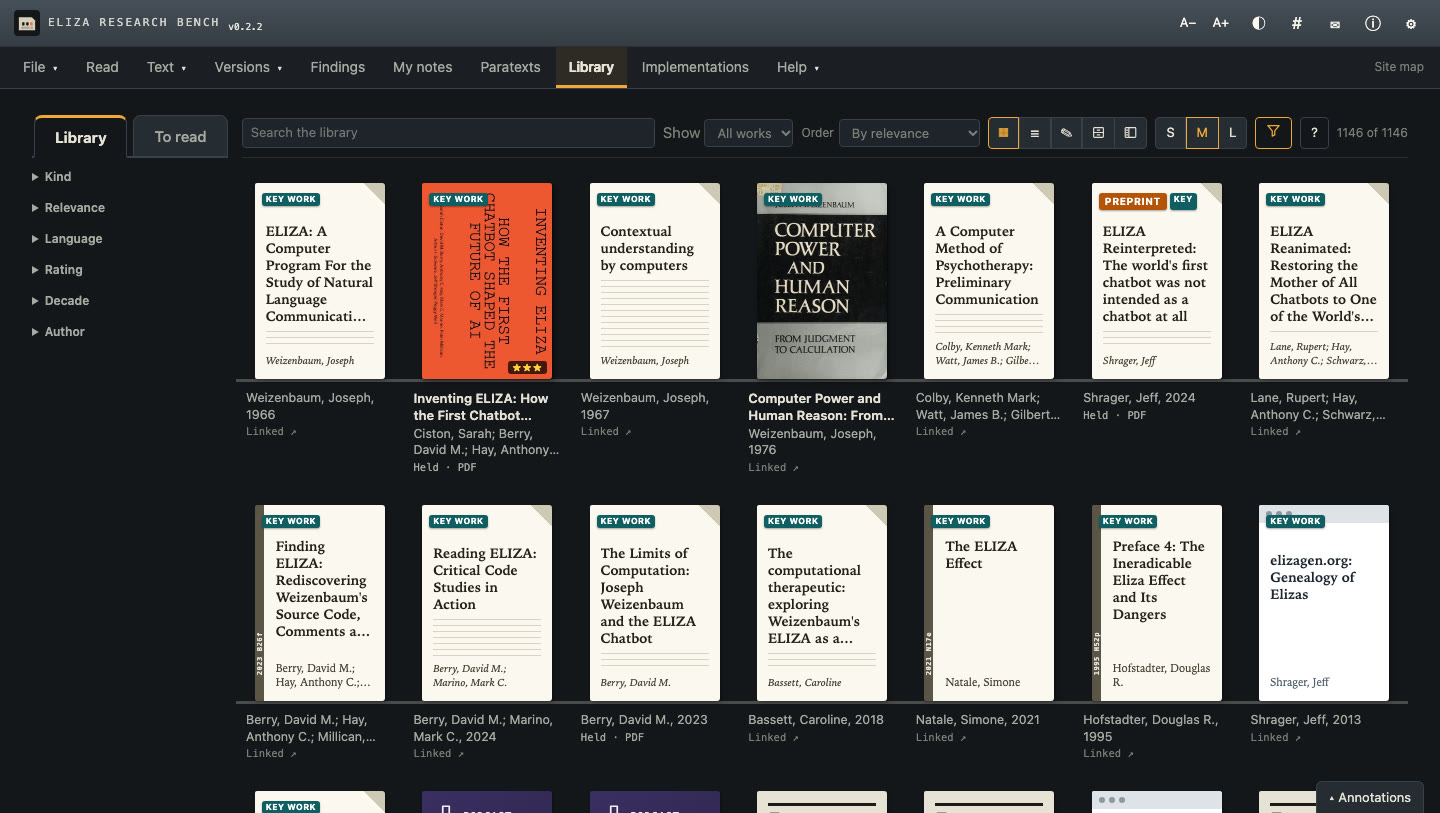
The views
The View buttons on the bar show the Library five ways. A reader’s choice is kept in that browser.
- Covers (▦): the works as covers on a shelf, small, medium or large (S M L), with the author, the year and whether the bench holds the work below each.
- List (☰): a line for each work, with its Key Work mark, its relevance as a label (Essential, High, Medium, Low, Minimal) and the group’s stars.
- Notes (✎): every note the group has written on works in the Library and in Paratexts.
- Card catalogue: the works in drawers (see The card catalogue).
- Gallery: the works on the left and the chosen one’s box on the right, as a file browser’s preview. The arrow keys move through the list, and Enter opens the box over the bench. The notes and covers of the five works after the one shown, and the two before, are fetched ahead.
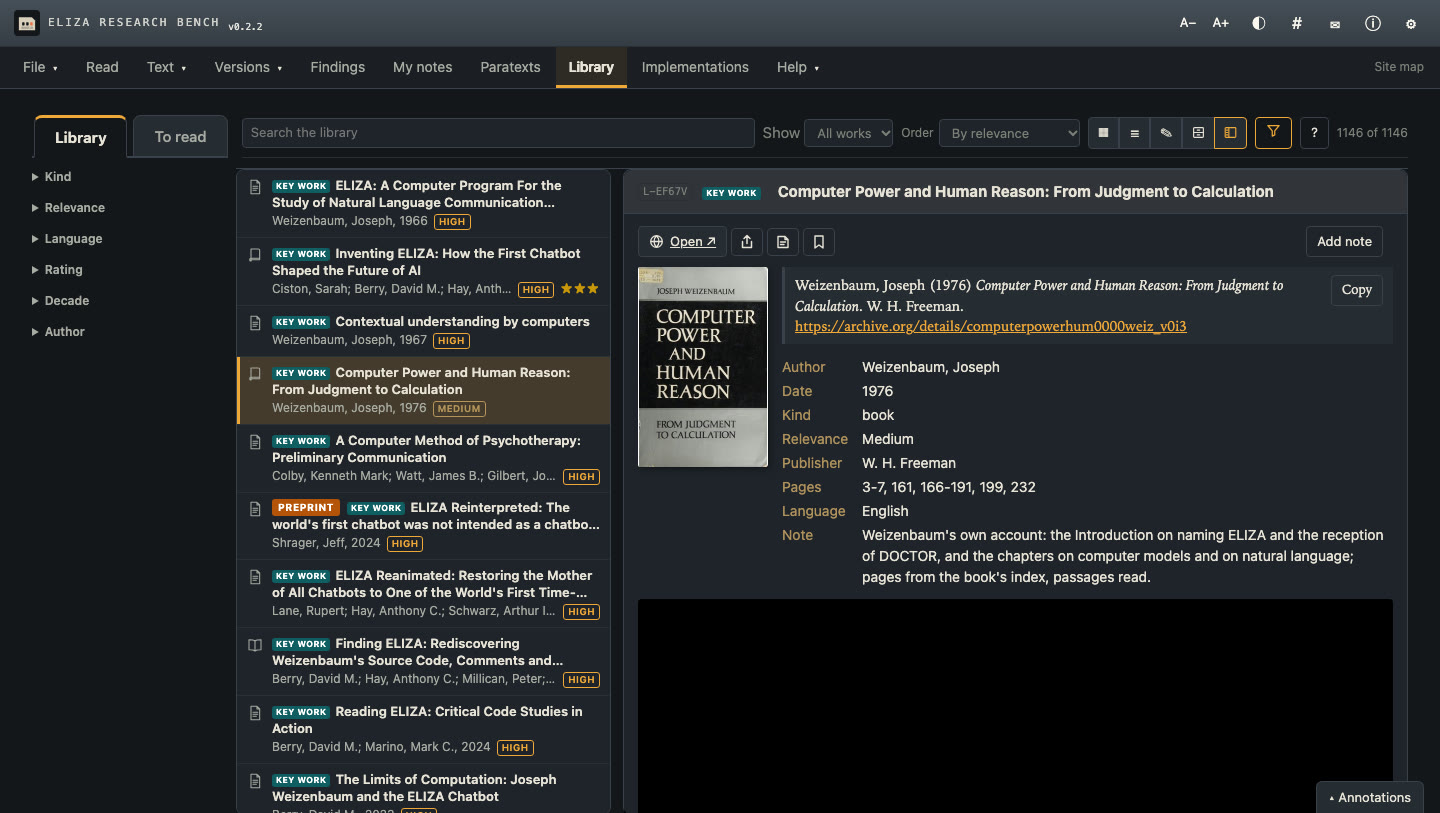
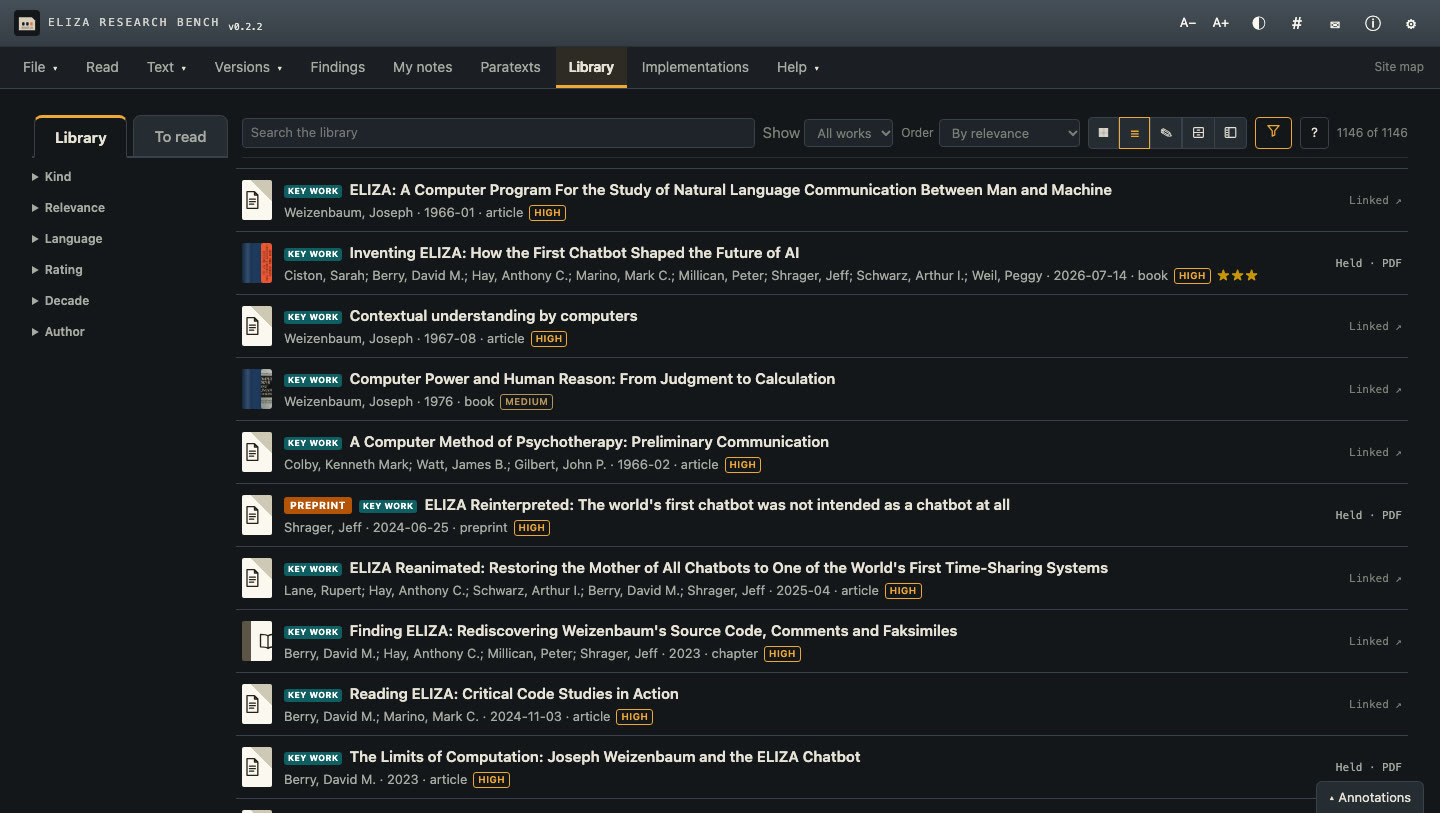
The tabs and the bar stay at the top as the works scroll; on a wide screen they share one line. A long library is drawn 150 works at a time, the next as the reader comes near the end. Covers drawn by the kit show at once, and an image of the work fades in over its drawn cover when it arrives.
The filters (kind, relevance, language, rating, decade, author and tag, with counts) stand in a pane of their own beside the works on a wide screen, and scroll on their own. Their headings are shut until opened, a heading with a choice in it opens, and they stay as the reader leaves them. The funnel on the bar shows or hides the pane.
Order sorts by author, title, newest, oldest, kind, language, rating (for a reader with the group’s token), or as the manifest lists them; on a bench whose entries have a relevance, By relevance comes first and takes the place of As listed.
What belongs where
- Paratexts: evidence, the material from or about the subject that the group studies. How a subject has been told is evidence where the group studies that. It stays private and reads with a member’s token.
- The Library: secondary literature, the work on the subject that the group reads and cites.
Where a work could be either, the person running the bench decides. Whether a work may be public is also that person’s decision: a session on a bench asks and does not settle it from its own reading of a licence.
The three kinds of entry
| The work | The entry | What a reader without a token sees |
|---|---|---|
| Under a CC licence, or freely distributable | file in the bench’s library/files/, licence saying which |
The file |
| Held by the group, and neither of those | shelf: 'private', file under library/ in the private repository |
The record, a line saying the group keeps a copy, and the link if there is a url |
| Not held | no file |
The record, and the link if there is a url |
url, where the work is published, is optional on all three. An entry needs only id and title.
A work with no link and no file is a stub: its record and its citation, tagged Record only. A published work the group holds only in its private archive can be listed this way, without its paratext code or archive details.
A member with a token opens a private file in the same box. The manifest is public, so a private entry’s record, shelf and file path can be read by anyone, and the list shows that the group holds the work. File names on the private shelf are public for that reason.
Two folders called library
- The bench’s
library/sits beside itsindex.html:library/where the page is at the top of the repository,research/library/where the page is inresearch/. It holdslibrary.jsonandfiles/. Paths in the manifest are from the page, so they arelibrary/files/…in both cases. - The private repository’s
library/is at the top of the repository that Paratexts keeps. A private entry’sfileis a path from there,library/…. Paratexts does not list that folder.
Adopting it
- In
js/config.js, setlibrary: true. The private shelf uses the repository inparatexts, orlibrary: { private: { org, repo } }. - In
index.html, loadkit/library.jsafterkit/paratexts.js(where the bench has it) andkit/md.js, and beforekit/shell.js. - Write the manifest,
library.jsonin the bench’slibrary/:
{
  "title": "Library",
  "items": [
    { "id": "L-001", "title": "An open article", "author": "A. Author", "date": "2020", "kind": "article",
      "licence": "CC BY 4.0", "file": "library/files/open-article.pdf", "url": "https://example.org/article" },
    { "id": "L-002", "title": "A recorded talk", "author": "B. Speaker", "date": "2019", "kind": "talk",
      "shelf": "private", "file": "library/recorded-talk.m4a", "url": "https://example.org/talk" },
    { "id": "L-003", "title": "A book", "author": "C. Writer", "date": "2001", "kind": "book",
      "url": "https://example.org/book" }
  ]
}
- Put public files in the bench’s
library/files/, and private files in the private repository’slibrary/. - Run the tests and every view, make the site map again where the bench has one, and release the bench as usual (
tools/release.js). Where the page is inresearch/:
node research/kit/tools/test.js
node research/kit/tools/views.js --kit research/kit
node research/kit/tools/sitemap.js
Where the page is at the top of the repository, the same tools run as node kit/tools/test.js --dir ., node kit/tools/views.js --kit kit --dir . and node kit/tools/sitemap.js --dir ..
Covers and order
A cover is drawn from the entry’s kind: book, thesis, article, chapter, letter, news, podcast, talk, documentary or web page, with near synonyms such as monograph, essay, preprint, conference, magazine, lecture, film or encyclopedia. Where kind names none of these, the file’s type decides, and otherwise a plain cover is drawn. Each book takes one cloth colour from its id, so a book keeps its colour between visits.
thumb gives an entry a picture for its cover, a path from the page or a link:
{ "id": "L-004", "title": "A book with a jacket", "kind": "book", "thumb": "library/thumbs/L-004.jpg" }
Put a bench’s own images in library/thumbs/, at about 260 by 390 pixels. A public image file is its own cover without a thumb. A picture that will not load leaves the drawn cover. The kit makes no thumbnails from PDFs or videos. Everything in library/thumbs/ is public, so the person running the bench decides whether a cover or a first page may be shown, as for a file. A link in thumb makes each reader’s browser ask that site for the picture. + Add a work takes a cover image as a link; the image for a member’s addition cannot go in the bench’s own repository, since a member’s token reaches only the private one.
Author order files under the first author’s surname: the part before the comma in Ōtsuka, Hisao, and otherwise the last word, so write a name whose surname comes first with the comma. Date order reads the first four-figure year in date. Entries with no value for the order chosen go last.
library: { view: 'list', order: 'new', size: 's' } in js/config.js sets what a reader sees first: view is icons or list, order is author, title, new, old, kind, lang or listed, and size, of the covers, is s, m or l. The default is medium covers by author. A reader’s own choice is kept in that browser.
README.md lists an entry’s fields. An id does not change once published, since links (?tab=library&lib=<id>) point at it.
Terms
The tab calls an entry Held where the bench holds its file, For the group where the private repository does, and Linked where it is only at its url.
Playing a link
A url on YouTube (through youtube-nocookie.com, with any t= as its start), Vimeo or the Internet Archive plays in the entry’s box. Where the reader cannot open a file, the player shows at once. Where a file opens, the file comes first and ▶ Play from… opens the player below it, and a held recording pauses. The player loads only when it is shown, and it is that site’s own: it asks that site for the work, and shows that site’s error if the uploader has turned embedding off, with the link still above it.
Files and size
A box shows PDF, text, Markdown, HTML, images, audio and video; any other file can be downloaded. A private file is read whole through GitHub before it opens, and GitHub holds no file over 100 MB. GitHub Pages limits a published site to 1 GB, so check the size of library/files/ before pushing.
The bench does not show the private repository’s size to its readers; the person running the bench can read it with gh api repos/<org>/<repo> -q .size, in KB. The figure is GitHub’s and can lag: in a trial on 2026-11-06 it read 0 for a repository that had taken about 1 GB in the half-hour before. Moving or deleting a file within the repository does not reduce that size, since the history keeps the file. Reducing it means rewriting the history or starting a new repository, which is a decision for the person running the bench.
Adding from the bench
A member whose token can write to the private repository has + Add a work on the Library tab; the bench asks GitHub, and shows nobody else the button: a record, with a copy of the work or without. A member’s token reaches the private repository only, so the entry goes in library/additions.json there, and a copy beside it as library/<id>.<ext>. Members see additions in the list at once, marked as not yet public, and can correct or remove them. Nobody else sees them. The token needs Contents read and write, as Paratexts asks. A copy added from the bench is limited to 40 MB, since GitHub’s API took 41.5 MB and refused 42 MB in a trial on 2026-11-06; a larger one goes in through git, up to GitHub’s 100 MB. GitHub also answered 502 to one of 31 uploads near 40 MB in that trial, and left nothing behind; the member is told to try again. Five members saving at the same moment all got through; of ten, three were told to try again and nothing was lost.
The person running the bench publishes additions to the public list, from a clone of the private repository:
node research/kit/tools/library-publish.js ../my-paratexts
That lists what is waiting and changes nothing. With --write it moves the entries into the bench’s library.json, takes them out of additions.json and removes the name of who added them; --only L-ABC12,L-DEF34 takes some and leaves the rest. It commits nothing: commit and push each repository. An entry published with a copy stays on the private shelf, with the record and file path public. To make the file itself public, once its licence allows it, move it to the bench’s library/files/ and change its file and shelf in library.json.
A copy kept as a paratext
An item that stays in Paratexts can name a Library entry, with library: [id] in its record or a tag library:<id>. A member then sees it in that entry’s box. The public manifest does not name the paratext.
Moving items out of Paratexts
tools/library-move.js moves catalogue items into the Library and back. It works on a clone of the private repository and the bench’s folder, and commits nothing. Run it from the bench’s repository.
- Make a plan, which writes the entry each item would become:
node research/kit/tools/library-move.js ../my-paratexts --plan P-AAAAA,P-BBBBB --out plan.json
-
Correct
plan.json. Eachnotestarts asnulland has to be set, a string or"", because a catalogue’s description may hold the group’s working remarks; the description is beside it as_descriptionand is not copied. Eachshelf, on the entry and on each of itsalts, starts asprivate; setpublicfor a file the person running the bench has decided may be public.urlstarts as the first web address in the record. Files named in a description are listed as_namedInDescriptionand stay where they are, unless you add them toalts. -
See what it would do, then do it:
node research/kit/tools/library-move.js ../my-paratexts --apply plan.json
node research/kit/tools/library-move.js ../my-paratexts --apply plan.json --write
- Commit and push the bench and the private repository.
The Library’s id is the item’s P-code, so links and citations to the code still work: ?code=P-AAAAA and a code in an annotation open the entry in the Library, and a paratext related to it lists it as in the Library. The Type of the record becomes kind, its creator author, its contributors the one line contributor.
library/moved.json in the private repository keeps each whole catalogue record, including the fields the Library does not use, its comments and its collections. To move items back:
node research/kit/tools/library-move.js ../my-paratexts --back P-AAAAA,P-BBBBB --write
That restores the record at its old place, and its files, and takes the entry out of library.json. Changes made to the entry since it moved are not carried back, and the tool says when there are any. A file on the public shelf, once pushed, stays in the public repository’s history: moving it back does not remove it from there, and the tool says so when it moves a file to the public shelf or back.
Moving does not reduce the size of the private repository (see Files and size).
An entry already in library.json, put there by hand, is taken over with --adopt:
node research/kit/tools/library-move.js ../my-paratexts --adopt P-AAAAA,P-BBBBB --write
The entry and its note stay as written. The record goes from catalogue.json into library/moved.json, and its files stay where they are in the private repository, for --back. --back then restores the record and takes out the entry and any public copies the entry named.
Relevance
relevance on an entry says how far it concerns the bench’s subject: essential, high, medium, low, minimal or unchecked, shown as Essential, High, Medium, Low, Minimal and Not Checked. The values from 1.8.0 still read: about as High, section as Medium, mention as Low and unread as Not Checked.
A member with the group’s Hypothesis token changes a work’s level with the Relevance drop-down in its box. It is kept as a tag in the group (tag:on:High), and a tag naming a level comes before the field. So library.json gives the level every reader sees, and the group’s choice overrides it for the group. Choosing No level takes the group’s tag off, and the work falls back to its field. A level can also be set as a tag in library.json (tags: ['High']), or typed in the box’s tag field. The level shows in its drop-down and its filter, not among the tags. Where any entry has it, By relevance is the first order, by author within each group, and there is a Relevance filter and a line in the record. An entry without it comes last. An entry with a number in key (1, 2, 3…) is a key work: in this order, key works come first by that number, ahead of the groups and whatever their relevance. Other orders ignore key for sorting. It replaces As listed in the menu on that bench, so library: { order: 'listed' } shows By relevance there, and a bench that sorted its manifest by hand can stop. A bench whose library.order names another order keeps it as what a reader sees first. Without the field, nothing changes.
Key works
A key work carries a Key work badge on its cover, in the list and in its box, on any bench. There are two sources:
keyinlibrary.json, which every reader sees.- The mark in an entry’s box, for members with the group’s Hypothesis token. It is an annotation in the group (
key:on,key:off), so members see it and readers outside the group do not. Any member can take off a mark, including one fromlibrary.json, and the latest mark counts. A mark added comes after the list’s key works, in the order the marks were made.
To show a mark to every reader, set key in library.json. A bench with no annotation group has no button. The box does not change the order of key works: edit the numbers in key for that.
Tags
An entry’s tags show in its box, and Filters and the search read them. There are two sources, as for key works:
tagsinlibrary.json, which every reader sees.- The tags members add in the box with the group’s Hypothesis token, one at a time with Enter, and suggested from those in use. Each is an annotation in the group (
tag:on:word,tag:off:word), so members see it and readers outside the group do not. Any member can take off a tag, including one fromlibrary.json, and the latest counts.
To show a tag to every reader, put it in library.json. A bench with no annotation group shows its tags with no way to change them.
Export
The export icon beside Share in an entry’s box gives that work as RIS or BibTeX. Download RIS saves a file that Zotero, EndNote and Mendeley open; Download BibTeX and Copy BibTeX give BibTeX, and copied it goes into Zotero by File ▸ Import from Clipboard. The work carries its authors, title, the journal or book it is in, year and date, publisher, pages, DOI, link, language, note and tags, and its code as the RIS ID. The kind sets the type (book, chapter, journal article, thesis, film, and so on); a kind the kit does not know is exported as a generic item.
author holds authors only. Editors, translators and the like go in contributor, each group after its role: eds Amano Teiyū, Omodaka Hisayuki; translated by Takeshi Morisato. Export reads eds/edited by as editors (RIS ED, BibTeX editor) and trans./translated by as translators (RIS A4, BibTeX translator). Names after a role are split at commas only where each has a space in it, so Surname, Given holds; and and & also split. A segment with no role word carries on the role before it, so names with the family name first go one to a segment: eds Amano, Teiyū; Omodaka, Hisayuki; translated by Takeshi Morisato. Other roles (introduction by …, complementary essay by …) go whole into a note, words and all. Original script in brackets after a romanised form is dropped on export with its brackets. pages is a page or a range; a volume’s size goes in extent (331 p.; 23 cm), and a book or thesis exports its first number as the page count. A name written in its own script after a romanised form (Kuki, Shūzō 九鬼周造) exports as the romanised form, so Zotero reads surname and given name; a name in its own script alone is kept. kind: 'translation', 'parallel text', 'edited volume' and 'anthology' export as a book. A reference leads as Cite Them Right Harvard has it (check against CTR Online for your edition): the author; with no author, a volume’s editors from contributor, with “(ed.)” or “(eds)”; a newspaper or magazine piece’s publication, from in; a web page’s or report’s organisation, from publisher; else the title, with the year after it. A chapter gives “in”, its editors where contributor has them, and the book. Author order, By relevance, To read and the card catalogue sort on whatever leads, so a work with no author files among the rest, not at the end. Call numbers are unchanged.
Checking records
A work added by hand, through Add a work in the Library or added in Paratexts, carries a hidden check: "unchecked", which readers never see and publishing keeps. tools/library-check.js lists those, and in any record a role word in author, pages that is not a page or range, a missing title, and a book’s, chapter’s, article’s or thesis’s missing author or date. Run it on library.json, or a private repository’s additions.json or catalogue.json; --checked ID,ID clears the mark once a record has been looked at, and --dir DIR (or a folder in place of a file) reads the bench’s library.json from that folder. The release tool says how many records in library.json want a look.
node research/kit/tools/library-check.js research/library/library.json
node research/kit/tools/library-check.js research/library/library.json --checked L-ABCDE
The card catalogue
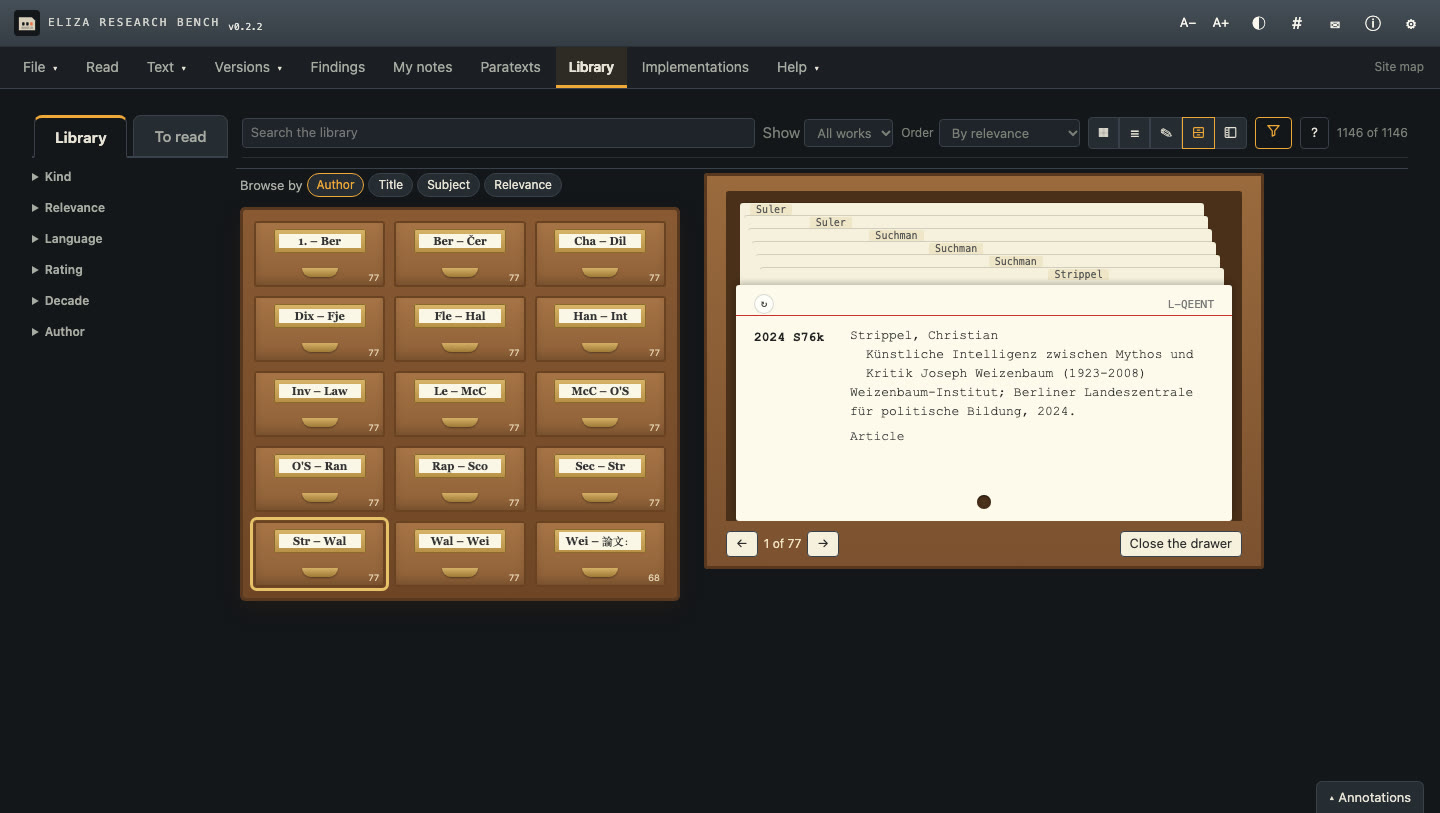
The drawer button beside the covers, the list and the notes shows the Library as a card catalogue. Drawers are made from the list as it stands, about fifteen of them, each with a brass plate giving the first and last names in it and its count, so they rebalance as works are added. Browse by Author, Title, Subject or Relevance remakes them: by subject a work has a card under each of its tags, and by relevance there is a drawer for the key works and one for each level. Pulling a drawer out shows its cards standing on the rod, the tops of those behind with a tab each and the front card in full, typed: call number, author, title, imprint and kind, the subject tracings (the tags) numbered, the Key work and Preprint marks and the group’s stars. The arrow keys flick through, Enter opens the work, Escape closes the drawer. A search and the filters narrow the drawers, and a search opens the drawer holding the first it finds.
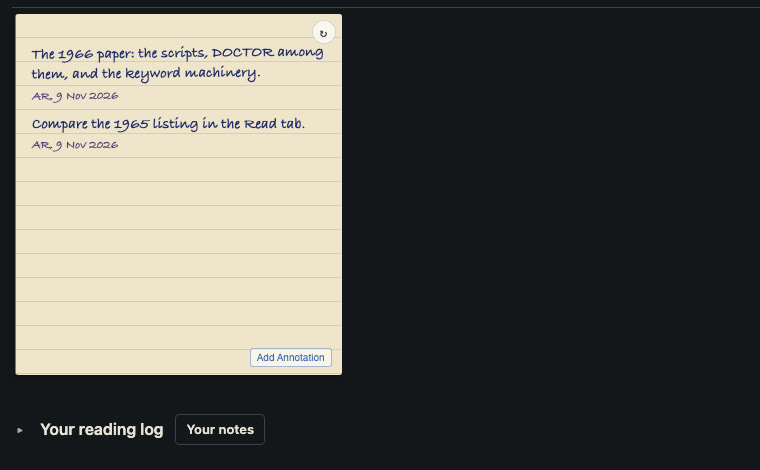
A card in the catalogue, and a book card on the To read shelf, turns over with ↻: its back has the group’s notes on the work, in the order they were written, scribbled by hand, or is blank. The back is the same card, its paper and its age. Add Annotation at the foot of every back opens the work’s box ready to write one; without the group’s token it stays a draft in that browser. A reader with no token sees the notes in their own browser only.
To read
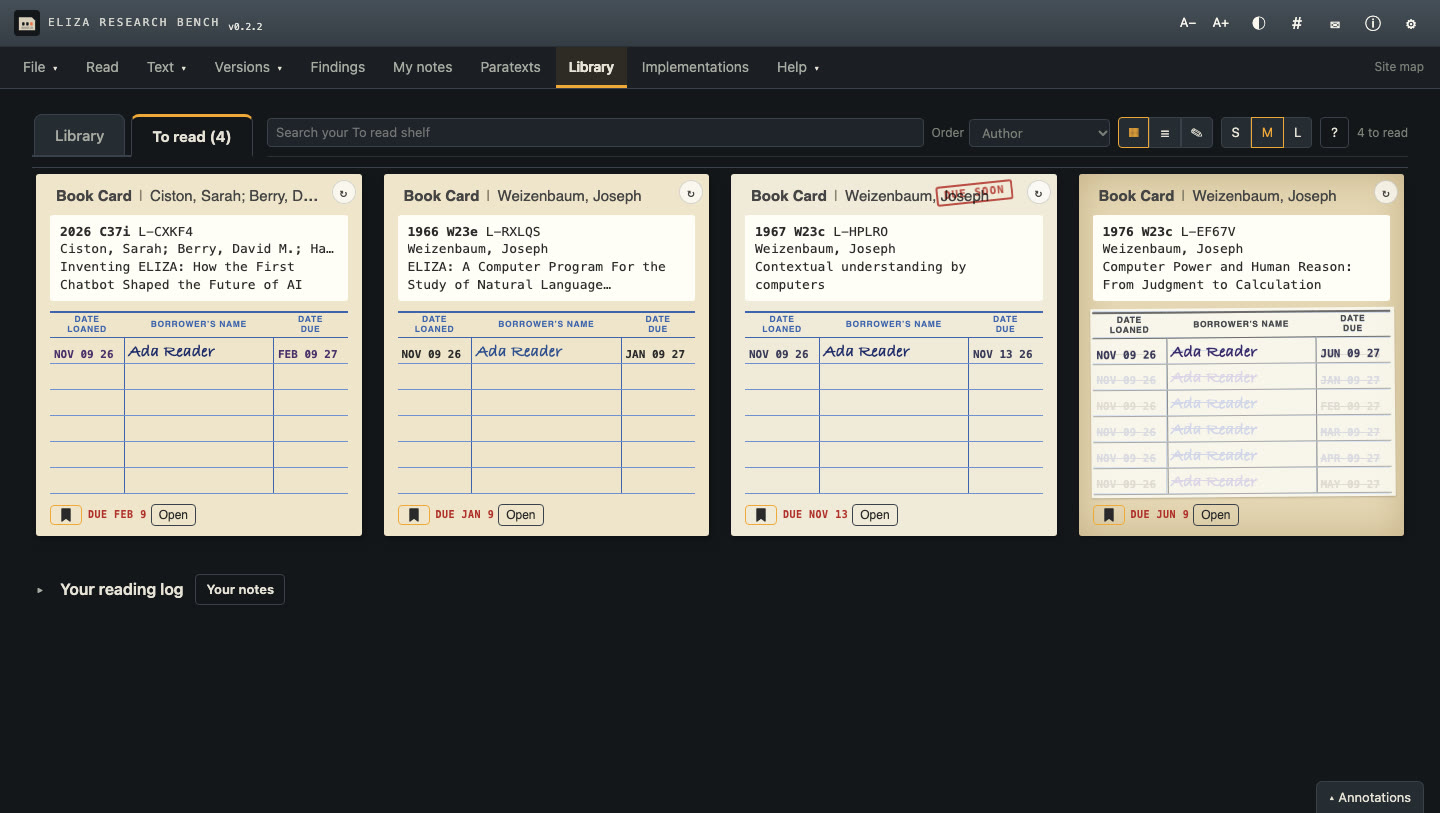
Each reader has a To read shelf, a part of the Library to attend to. A work is checked out from its box for one, two or three months, and its cover then carries a due stamp in its upper right corner, in that reader’s view only. Past its date a work goes back into the library.
The To read tab shows a book card for each work, after the cards once kept in a book’s pocket: Book Card and the author at the head; the call number, code, author and title; and a line for each loan and renewal, with the date loaned, the borrower’s name and the date due. A card renews a loan for one, two or three months as often as the reader likes, takes the date away, or returns the work. A card’s code and title open the work.
- Call numbers: each card’s label, and the spine of a drawn book, carries a call number after the old shelf marks: the year, the author’s initial and two figures from the next letters, and the title’s first letter (
1966 W48e). It is a guide to the shelf, not a classification. - Ink and paper: each line is written in its own pen and its dates in the desk’s stamp ink, and a line crossed out fades in an aged version of its own ink. Each card has its own paper, a few creams and buffs with the odd darker orange, and yellows with use. Paper and age are kept in the browser once chosen, and age only grows.
- A full card: a card holds six lines (three at size S). When it is full, a white sticker goes over the old lines, which show faintly through, and the next are written on it. Clicking the sticker shows every line.
- Due soon: a work due back within seven days (or as the reader sets in Settings ▸ Library) is stamped DUE SOON on its card, and one past its date OVERDUE.
- Sizes and the list: the cards come small, medium or large (S M L), and ☰ shows the shelf as a list with the same renewals. The card catalogue and the gallery, which are ways into the whole library, are put away on this tab.
Below the cards, a reading log lists every work the reader has had out, with when it first went out, when it came back, how many loans, and the reader’s own rating where they gave one. Your notes there opens, in a box, every note the reader has written on works in the library, drafts included, each with a link to its work.
What’s new lists the reader’s works due back within the week, with Overdue for any past their date that the shelf has not yet sent back, and those that went back in the last week, each opening its work. A work due soon or overdue is an alert there, kept at the top until it is renewed or returned. They count in the What’s new button, and readers with no token see them too.
Loans in the group
Loans are kept in the reader’s browser. With the group’s Hypothesis token they are also kept as annotations the group can read (loan:out:<date>, loan:ext:<date>, loan:back), so they follow the reader to other browsers. A loan made in a browser before the reader had a token is sent up, with its date, the first time they have one. Each check-out and renewal carries a short reference and the inks its line is written in (loan:out:<due>:<out>:<ref>:<pen>.<stamp>), so one sent twice is read once and a line keeps its look in every browser; a line from before inks were kept (bench-kit 1.8.16) is given a pen and stamp of its own. Where the group can be read, it is the record; the browser’s copy serves a reader with no token, or offline, and for a minute after a change, while the group’s search catches up. A work’s card then has a line for each member’s loan of it, and its box says who in the group has it out and till when. A reader with no token sees only their own. tools/library-snapshot.js never publishes loans.
Settings ▸ Library
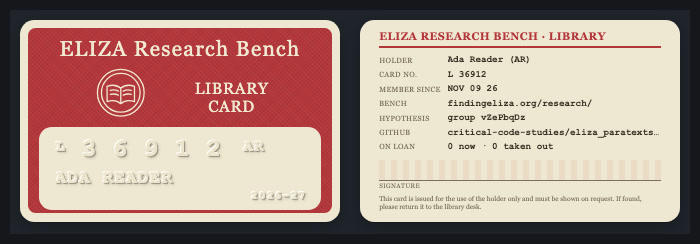
Settings ▸ Library shows the reader’s library card, after a 1960s student card: the bench’s title (else name) over a red ground, fitted to the card however long, and the reader’s initials and name embossed with a number made from them. Clicked, the card turns over: its back gives the holder, the card number, the date they joined (their first check-out), the bench’s address, their Hypothesis group and account, the GitHub repository (and whether a token is held, never the token), and their loans.
The same tab sets whether book cards are signed with the reader’s name or initials, and how many days before its date a work is due soon (0: only when overdue; 7 by default).
Wipe my loan history… takes every work off the reader’s To read shelf and clears their reading log and their lines on the book cards. It asks first, with the count. For a member with the group’s token, it also deletes their own loan records in the group, one at a time, and says if any could not be deleted. Other members’ loans are kept. It cannot be undone.
For readers with no token
A private Hypothesis group can be read only with a member’s token, so without more, ratings, marks and tags made in the box are seen by members only. tools/library-snapshot.js publishes them: it reads the group and writes library/group.json, which the Library loads for every reader. Covers, the filters, the order and the record then show them. A member with a token still sees the group live.
It holds, for entries in the public library.json, the average rating and how many gave one, the Key work marks and the tags. It takes no note text, replies, emoji or names, and it is not written from them: only the reactions for ratings, marks and tags are read into it. Tags are published as typed. An average from one rating is one person’s view with no name on it.
HYPOTHESIS_TOKEN=... node research/kit/tools/library-snapshot.js --dry-run
Set library: { snapshot: true } in js/config.js once the file exists; the Library asks for it only then. To run it each day, copy templates/library-snapshot.yml to .github/workflows/library-snapshot.yml and add a repository secret HYPOTHESIS_TOKEN, from a Hypothesis account in the group. A token reaches every group its account belongs to, so an account made for this and in this group alone is safer than a person’s own. A token that is not a member, or any failed read, writes nothing.
Preprints
An entry with kind: 'preprint' carries a Preprint badge on its cover, in the list and in its box. A preprint kept beside its published version is a second entry, with the note on each naming the other.
Sharing an entry
Share in an entry’s box opens the system’s share sheet (Mail, Messages, AirDrop on a Mac) with the entry’s title and a link that opens its box. A browser with no share sheet, such as Firefox, copies the link.
Posted in a chat or on social media, the link shows one preview card for the whole Library, such as “Melville Library”. tools/release.js writes it into library/index.html at each release, and that page sends a person on to the entry. A release needs base in js/config.js, or an og:url in index.html, to write it. Until the page exists, links go straight to the bench.
| On the card | Comes from, in order |
|---|---|
| Title | library.card.title, then the bench’s name and library.label |
| Description | library.card.description, library.intro, then the intro in library.json |
| Image | library.card.image, the og:image in index.html, then a shelf of books from the kit |
An image should be 1200 by 630 pixels. Sites keep a card for a while, so a changed card can take time to show.
A large library
The tab’s Filters narrow by kind, relevance, language, rating, decade, author and tag, with counts. They come from the entries’ kind, relevance, lang, date, author and tags, so a large library is easier to search where those are filled in consistently, with one spelling for a kind and for a surname. Give lang as a language code (ja, de): readers see its English name, here and in the record, where the browser knows it, and the code where it does not. Rating comes from the group’s stars: the average to the nearest star, or Not rated. A facet with only one value does not show, so a bench with no ratings has no Rating filter.
Tried with 1,000 link-only entries in a browser: searching, filtering, ordering and switching view each took about 50 milliseconds or less, measured to the end of layout. There is no limit in the covers. A page of 1,000 covers is long to scroll, so search, the filters and the list do that work; library: { view: 'list' } starts a large library as a list.
Transcripts and other forms
alts gives a work other forms, each on its own shelf:
{ "id": "P-AAAAA", "title": "A recorded talk", "kind": "talk", "file": "library/files/talk.m4a",
  "alts": [{ "label": "Transcript", "lang": "en", "file": "library/talk-t1.md", "shelf": "private" }] }
A button below the work opens each one under it, so a transcript can be read while the recording plays. A private one shows for members only; its path is in the public manifest, as a private file’s is.
Citations
An entry’s box shows a citation with a Copy button, in Harvard form, built from author, date, title, in, publisher, pages and doi or url. The author is used as written. in holding only a note in brackets, such as (monograph), is left out. Where the built form is wrong, citation gives the citation as written.
Notes on a work
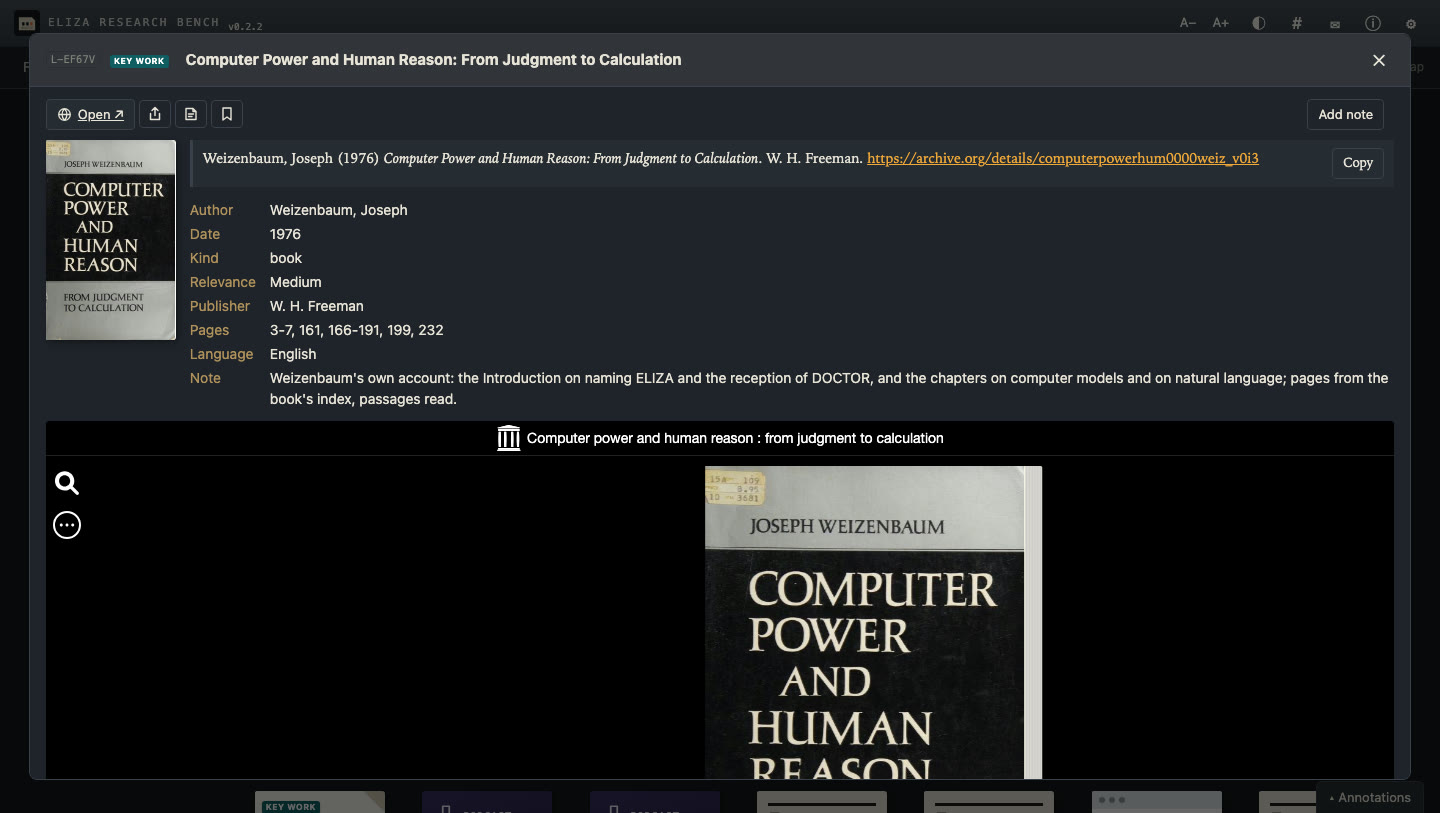
The panel in an entry’s box, and in a paratext’s, holds notes in the bench’s Hypothesis group, with replies and reactions as on a text, so they need that group’s token and are visible to the group only. Without one, a note stays a draft in that browser. A note is an annotation with item:<code> in place of a version, tagged bk:kind:item, and pinned if wanted by bk:at:t:<seconds>, bk:at:p:<page> or bk:at:q with the quoted words. The code stays when an item moves from Paratexts to the Library, so its notes go with it.
A work with no notes opens in one column, with Add note and the stars at the end of its row of actions; Add note slides the notes’ panel out with the box to write in ready. A work with notes opens with its panel.
Members also give an entry one to three stars and reactions, at the end of the box’s row of actions. Each is a reaction in the group with no parent, with ★1 to ★3 or the emoji as its text, and a person’s latest rating counts. Reactions show as the annotations show them: only those someone has left, each with the initials of who left it, then ☺+ to open the rest. The average shows on the cover and Order can sort by it, an option offered only to a reader with the group’s token. A paratext keeps its own ratings in its catalogue, so a rating there does not follow an item to the Library unless someone moves it by hand.
A cover shows a count, Annotated filters to those, and ✎ lists all the notes across the Library and Paratexts. Paratexts’ cards show the count too. Paratexts’ own comments and ratings remain as they were, kept in its catalogue and separate from these notes.
A pin goes back to its place on a held recording, on YouTube and Vimeo by restarting their player there, and on a PDF in the browser’s viewer. A paratext’s PDF, drawn page by page, does not yet go to a pinned page.
Not in the kit yet
- Comments on Library entries as in Paratexts’ catalogue. The Library has notes in the group instead.
- A note pinned to a region of an image.